Off-Campus Access to Physical Review
APS and the Physical Review Editorial Office Continues to Support Researchers
COVID-19 has impacted many institutions and organizations around the world, disrupting the progress of research. Through this difficult time APS and the Physical Review editorial office are fully equipped and actively working to support researchers by continuing to carry out all editorial and peer-review functions and publish research in the journals as well as minimizing disruption to journal access.
We appreciate your continued effort and commitment to helping advance science, and allowing us to publish the best physics journals in the world. And we hope you, and your loved ones, are staying safe and healthy.
Minimizing Disruptions to Journal Access
Many researchers now find themselves working away from their institutions and, thus, may have trouble accessing the Physical Review journals. To address this, we have been improving access via several different mechanisms.
Other Ways to Access Journal Articles Off-Campus
- Google Scholar CASA
If you have any Google account, you can access your institution’s Physical Review subscriptions by using Google Scholar CASA to download PDFs, even when off campus.
To activate CASA:
- Log into any of your Google accounts (institutional or personal), from within your institution’s IP ranges. If you are off campus, you may need to use your institution’s proxy server or VPN to access Google Scholar.
- Visit https://scholar.google.com/ and do a search.
- This will create the association between your Google account and your institution’s subscriptions.
- Stay logged into your Google account to download journal articles.
- APS Journal Account “Go Mobile” Subscriptions
You can use your APS Journal account to make your institutional subscriptions accessible from any of your computers or devices.
To activate the mobile feature:
- Log into your APS Journal account while accessing one of the subscription Physical Review journals (for example, Physical Review Letters from within your institution’s IP range. Don’t have an account? Create one.
- Navigate to any abstract page.
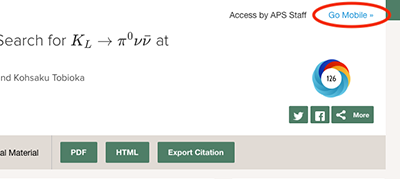
- Click on the “Go Mobile >>” link. It is located in the upper right-hand corner of the abstract page, below the main banner adjacent to the “Access by” text (see screenshot below).
- Click the ‘Activate’ button. This will give you subscription access whenever you are logged in with your APS Journal account, wherever you may be, from any device you may be using. You will be able to get remote access for up to three months.
- Shibboleth/Institutional Single Sign-on/OpenAthens
Many institutions provide for off-campus access via a protocol called Shibboleth, which authenticates users through their institution’s local sign-in process and shares the necessary authorization with us. To enable Shibboleth/OpenAthens for your institution please have your librarian contact help@aps.org (more info).
Support
For any questions, please contact our Help Desk at help@aps.org.

